Why there are no downloads yet
Everything custom on Elder Haven currently runs on the server and uses assets already in the client. That includes Insight / Prestige, the quests and the combat changes. You don't need an Elder Haven TRE patch or a separate launcher for them.
You do need a working, compatible Pre-CU Star Wars Galaxies client. If you already have one, add Elder Haven to its login list.
Adding Elder Haven to your login list
Create a new login entry in your client setup tool with these details:
| Field | Value |
|---|---|
| Name | SWG Elder Haven |
| Host | 207.244.229.181 |
| Port | 44453 |
Put the host and port in their separate fields, as shown below, then save the entry:
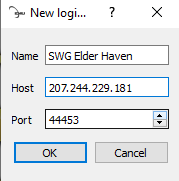
Connection address: 207.244.229.181:44453
Creating your account
There's no registration form to fill out. After adding Elder Haven to your login list, launch the game, enter your chosen username and password, and log in. Your account is created automatically the first time you connect.
More content and a launcher
I plan to keep adding to Elder Haven during alpha and beyond. That includes more custom quests, encounters, mission objectives and other content.
An Elder Haven launcher is also planned for when custom client files are added, to make setup and updates easier. It isn't available yet. When it's ready, the launcher, downloads and instructions will go on this page.
The server is open in alpha. You can join Discord for updates, help getting connected and bug reports.
Once you're connected, the new player guide covers your first Insight levels, buffs and missions.